Approve conversion stages and costs

Beta. Conversion progresses through reviewable stages. Read the current proposal before granting permission to continue.
-
Open the conversion status and proposed next stage.
-
Read what will be converted and any unresolved questions.
-
Review the estimate, remaining promotional coverage and available credits.
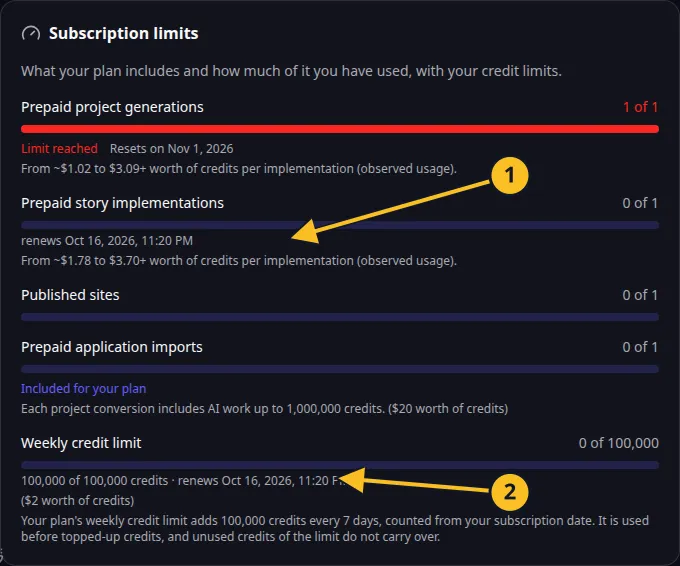
Billing: included action allowances and the current seven-day credit frame. -
Decide whether to proceed, adjust the scope or stop.
-
Confirm the supported decision once. Through MCP, send
confirm: trueonly after a person has agreed. -
Follow the existing conversion status until that stage completes or requests another decision.
Eligible Pro conversion coverage is one lifetime promotional conversion with up to 1,000,000 AI credits. Work beyond that cap can use applicable credit limits and then topped-up credits. Read conversion allowance.
An estimate is not a guarantee of the final cost. Large source trees, complex behavior or follow-up work can increase usage. If the proposed stage no longer matches your intention, resolve that before confirming.
Use the conversion reference for the supported proceed_conversion decision values. Do not invent a decision string from a button label.
Contractual purchase and credit conditions are in the Platform License and Terms.