OwlMeans MCP

On this page
Use OwlMeans AI pipelines from your preferred coding agent. MCP connects the client to project creation, user stories, free flight changes, previews and account controls.
The pipelines provide a defined workflow for planning and development. Common application building blocks and project guidance help work follow a consistent architecture and access model. You stay responsible for reviewing the proposed scope, cost and generated behavior.
Why use the pipelines
OwlMeans pipelines reuse the application foundation and guide planning, implementation and review through defined steps. That reduces the code and instructions an agent has to recreate for each feature. Shared contracts and authorization conventions help changes remain consistent as the app grows.
You can concentrate development on the next useful story instead of asking an agent to design the whole foundation again. This can shorten development and reduce repeated AI work. Check the displayed estimates and credit use for your own project; actual cost depends on the requested work.
Choose a connection
| Connection | Use it when |
|---|---|
| Local stdio server | Your agent needs workspace files, a local app or delegated inference. |
| Hosted HTTP endpoint | You want a remote MCP client to manage a hosted project. |
-
Follow the quickstart.
-
Choose project location and inference mode.
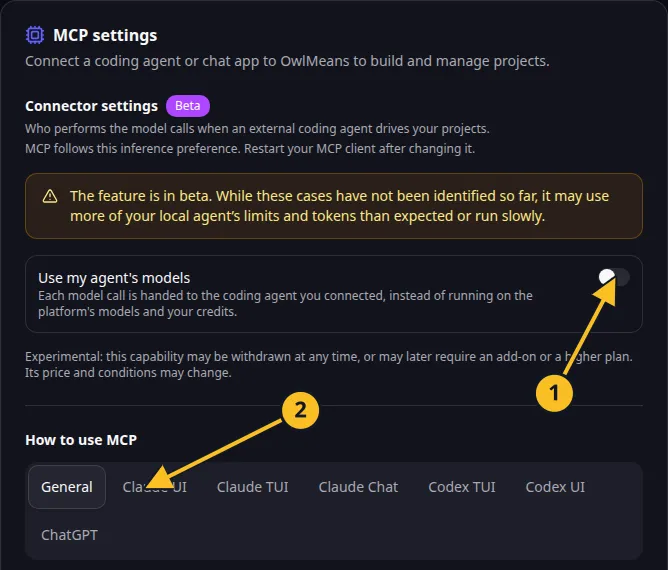
OwlMeans MCP settings: 1, inference preference; 2, client setup tabs. -
Open the guide for your client.
-
Ask the agent to inspect
describe_platformandsession_status. -
Create or attach a project and start one focused workflow.
Guides and reference
Client guides cover Claude Code CLI, desktop and VS Code; Codex CLI, app and VS Code; ChatGPT; Claude chat; GitHub Copilot in VS Code; and OpenCode. Their configuration files and interfaces differ, so follow the page for the client you actually use.
The tool reference groups public tools by task. Availability depends on the host, project location and inference mode. Ask your connected server for its current tool list before relying on a tool.
Read plans and costs before starting work. Delegated inference can use your coding agent’s own limits and charges.
Browse this category
- Quickstart
- Choose project location and inference mode
- Sign in and manage access
- Install and use your project harness
- CLI commands, options and environment variables
- Connect your client
- Development workflows
- Tool reference
- Discovery, sessions and harness tools
- Projects and project lifecycle
- User stories and planning kits
- Free flight, pipelines, tasks and questions
- Files, previews and local runtime
- Git and GitHub
- Application users, permissions and organizations
- Configuration and branding
- Account settings, inference, tokens and privacy
- Publishing, domains and production controls
- Conversion
- Activity, notifications and file changes
- Troubleshoot your MCP connection
Names and marks
GitHub and GitHub Copilot are brands of GitHub, Inc. Usage policy.
Visual Studio Code, VS Code, TypeScript and related Microsoft marks belong to Microsoft Corporation. Usage policy.
OpenAI, ChatGPT and related OpenAI marks belong to OpenAI; Codex is an OpenAI product. Usage policy.
Claude and Claude Code are Anthropic products; their names and marks remain with their respective owner. Usage policy.
Node.js, npx, Git, OpenCode names and any associated marks remain with their respective owners or project maintainers. References identify products, standards or source examples. OwlMeans documentation does not imply sponsorship or endorsement by those owners.