CLI commands, options and environment variables

On this page
Use CLI settings to make the connection’s target, inference and workspace explicit. Client configuration stores a command and an argument list separately.
Commands
| Command | Use |
|---|---|
| No subcommand | Start the stdio MCP server. |
login | Start browser authorization and save local access. |
logout | Remove locally stored access. |
status | Inspect local connection and access status. |
url | Display the relevant connection URL. |
Server options
| Option | Values or purpose |
|---|---|
--api-url | OwlMeans API base; ordinarily leave the production default. |
--target | local or cloud; default local. |
--llm | cloud or local; local means delegated inference. |
--harness | claude-code, codex, copilot or opencode. |
--project-dir | Absolute workspace directory to use explicitly. |
--http | Development HTTP mode; not required for the hosted production endpoint. |
Environment
| Variable | Purpose |
|---|---|
VIABLE_API_URL | API base override. |
VIABLE_API_TOKEN | Explicit access credential; supply through a secret environment. |
VIABLE_TARGET | Project location. |
VIABLE_LLM | Inference mode. |
VIABLE_HARNESS | Agent harness selector. |
VIABLE_PROJECT_DIR | Explicit workspace path. |
VIABLE_MCP_URL | MCP endpoint override where supported. |
OWLMEANS_CREDENTIALS | Private local credential file; the default is ~/.owlmeans. |
Workspace selection
-
Prefer the workspace your client advertises through MCP roots.
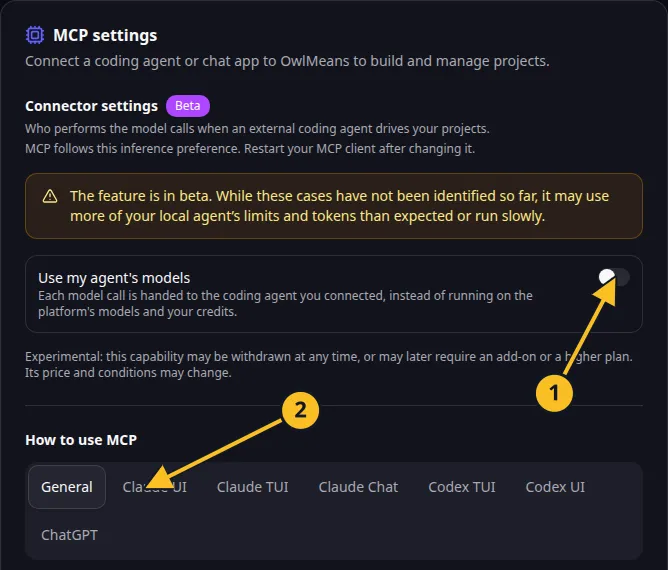
OwlMeans MCP settings: 1, inference preference; 2, client setup tabs. -
Use
--project-dirfor an intentional explicit override. -
Where no roots are available, the supported Claude project directory or working directory provides the fallback.
-
If a client advertises roots but no usable root, correct that configuration rather than relying on an unrelated directory.
-
Verify the result with
session_statusbefore file-changing work.
Explicit flags take precedence over corresponding environment defaults. Restart the client after changes. Do not store secrets in the command’s arguments. For available commands in your installed version, run the CLI’s help rather than copying flags from an older configuration.
Names and marks
OpenAI, ChatGPT and related OpenAI marks belong to OpenAI; Codex is an OpenAI product. Usage policy.
Claude and Claude Code are Anthropic products; their names and marks remain with their respective owner. Usage policy.
Node.js, npx names and any associated marks remain with their respective owners or project maintainers. References identify products, standards or source examples. OwlMeans documentation does not imply sponsorship or endorsement by those owners.