Develop and run your app locally

On this page
Run the generated application from a workspace you control. Use a stdio connection with a local target.
-
Open the project directory and connect MCP.
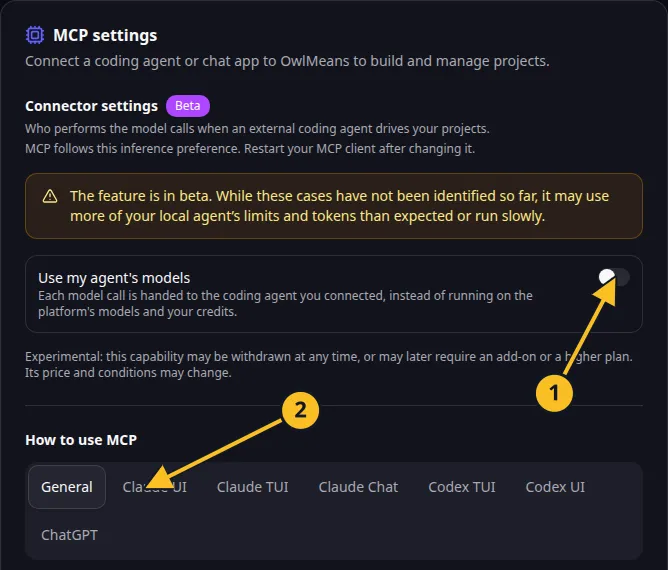
OwlMeans MCP settings: 1, inference preference; 2, client setup tabs. -
Verify
session_statusreports the intended local workspace. -
Call
local_statusto inspect prerequisites. -
Call
local_setup_guideand follow the project’s specific setup instructions. -
Supply a database and Valkey service when the app requires them. Use
set_local_serviceto record the selected addresses through the supported interface. -
Call
run_localwith the intended build choice. -
Open the resulting local address and try the main workflow.
-
Use
stop_localwhen you want to stop that app.
A local database keeps records on the service you choose. A local app does not automatically copy the hosted preview’s records or credentials.
Review generated configuration before inserting private connection URLs. Keep secrets out of shared client configuration and source commits.
The hosted HTTP endpoint cannot start processes on your machine. If a local tool is absent, verify the connection uses stdio and --target local.
Keep the project harness with the source and ask the coding agent to follow it when developing a story. See local runtime tools.
Names and marks
OpenAI, ChatGPT and related OpenAI marks belong to OpenAI; Codex is an OpenAI product. Usage policy.
Claude and Claude Code are Anthropic products; their names and marks remain with their respective owner. Usage policy.
Valkey is a Linux Foundation project. Its name and marks are used to identify the referenced technology. Usage policy.
Node.js, npx names and any associated marks remain with their respective owners or project maintainers. References identify products, standards or source examples. OwlMeans documentation does not imply sponsorship or endorsement by those owners.