Quickstart

On this page
Connect a coding agent, check the session and begin with a small request.
Local server
- Install Node.js 22 or newer and confirm
npxis available to the client. - Open the project directory in your coding client.
- Register a stdio server named owlmeans with this command:
npx -y @owlmeans/viable-mcp@^0.1.18-
On first use, sign in to OwlMeans in the browser and approve access.
-
Ask the agent to call
describe_platformandsession_status. -
Review the project location and inference mode the session reports.
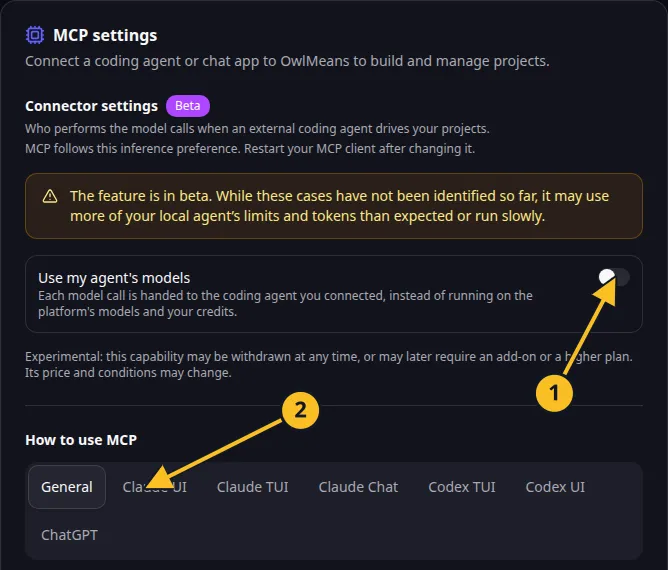
OwlMeans MCP settings: 1, inference preference; 2, client setup tabs. -
Ask it to create an app or attach an existing project.
The default project target is local. To use a hosted project instead, add --target cloud to the server arguments.
Hosted connection
Use a client that supports remote MCP and browser authorization. Add this server URL:
https://api.owlmeans.com/mcpThe hosted endpoint manages cloud projects. It cannot run a command in your local workspace or provide local delegated execution.
First request
“Use OwlMeans to create a small project and task management app. First draft the specification and show it to me. Do not accept it until I have reviewed it.”
Creation drafts the product first. confirm_project starts initialization after that review. Follow generation and stories.
Use your client’s guide for a copyable configuration and troubleshooting if the server does not appear.
Names and marks
OpenAI, ChatGPT and related OpenAI marks belong to OpenAI; Codex is an OpenAI product. Usage policy.
Claude and Claude Code are Anthropic products; their names and marks remain with their respective owner. Usage policy.
Node.js, npx names and any associated marks remain with their respective owners or project maintainers. References identify products, standards or source examples. OwlMeans documentation does not imply sponsorship or endorsement by those owners.