Troubleshoot your MCP connection

On this page
Check the connection before changing the project. Most setup problems can be narrowed to the server command, access, workspace or selected mode.
-
Confirm Node.js 22 or newer and
npxare available in the client process’s environment. -
Check the
owlmeansentry uses the client’s expected configuration format. -
Restart the client after saving configuration or changing inference preference.
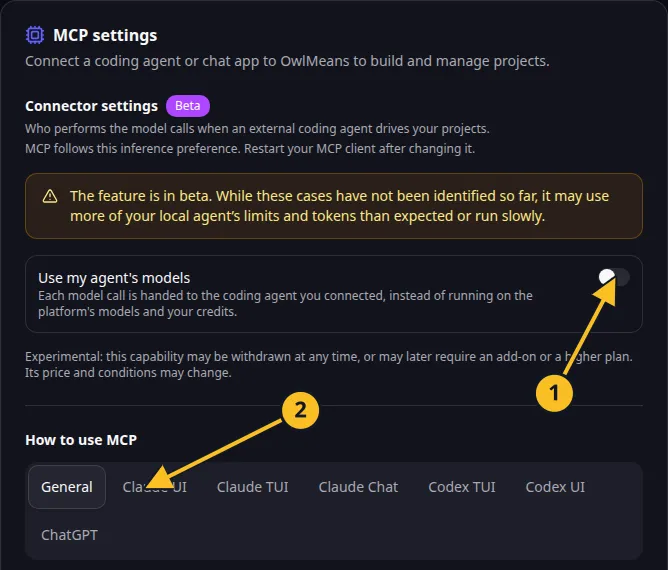
OwlMeans MCP settings: 1, inference preference; 2, client setup tabs. -
Inspect the server connection status, then call
session_status. -
Complete browser sign-in if access has expired or been revoked.
-
Verify target, inference mode and workspace before retrying the intended action.
| Symptom | Next check |
|---|---|
| Server does not start | Command path, argument array and client startup timeout. |
| Tools are missing | Connected host’s tool list, target and inference mode. |
| Local files are wrong | MCP roots and explicit project directory. |
| Access denied | Account, organization entity, token expiry and environment token override. |
| Delegated work waits | Agent task handling and outstanding questions. |
| Generation seems stopped | Existing project/run status before submitting again. |
Use a stdio connection for local execution or delegated inference. The hosted endpoint cannot access your workstation.
When reporting a problem, include the client, visible error, selected mode and non-secret status. Do not share credential files, access tokens or private connection URLs. Read sign-in and CLI settings.
Names and marks
OpenAI, ChatGPT and related OpenAI marks belong to OpenAI; Codex is an OpenAI product. Usage policy.
Claude and Claude Code are Anthropic products; their names and marks remain with their respective owner. Usage policy.
Node.js, npx names and any associated marks remain with their respective owners or project maintainers. References identify products, standards or source examples. OwlMeans documentation does not imply sponsorship or endorsement by those owners.