ChatGPT web and desktop
On this page
Use the hosted OwlMeans endpoint from a ChatGPT account permitted to create or use a custom MCP app. Full read/write custom MCP support currently requires an eligible Business, Enterprise or Edu workspace on the web; Pro developer-mode access is limited to read/fetch.
-
Open ChatGPT settings in the web app.
-
Check Apps → Advanced settings for developer mode, or your workspace’s app-creation controls.
-
Create a custom MCP app named
owlmeansusing this endpoint: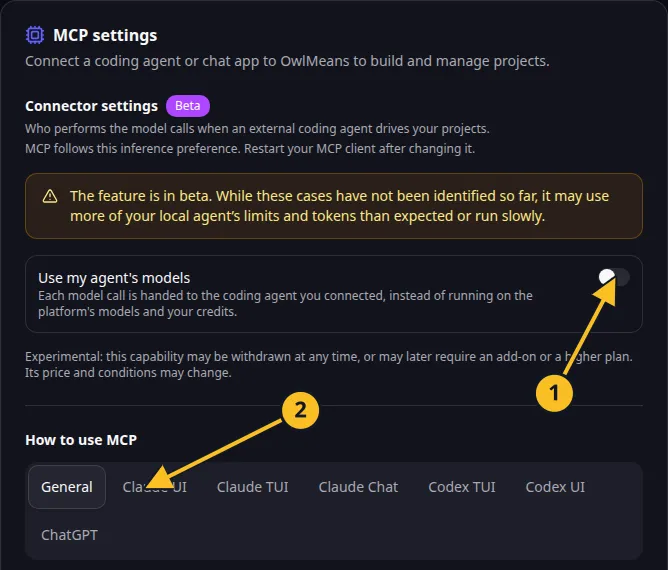
OwlMeans MCP settings: 1, inference preference; 2, client setup tabs.
https://api.owlmeans.com/mcp- Select the supported authorization flow and complete OwlMeans browser sign-in.
- Make the app available in the intended chat and ask it to call
describe_platformandsession_status. - Review the proposed specification before allowing
confirm_project.
Administrators may need to enable custom-app creation or approve availability. Current ChatGPT interfaces also group apps under plugins; follow the official developer-mode guide and your workspace’s controls.
A hosted chat connection operates cloud projects with cloud inference. It cannot run processes in your local repository or perform local delegated tasks. Use Codex or another stdio coding client for those workflows.
Use the web for the full custom MCP workflow. Do not assume the desktop app exposes the same custom-app tools; follow its current supported app or plugin features. Read plans and costs and keep purchase decisions in the browser.
Names and marks
OpenAI, ChatGPT and related OpenAI marks belong to OpenAI; Codex is an OpenAI product. Usage policy.
Claude and Claude Code are Anthropic products; their names and marks remain with their respective owner. Usage policy.
Node.js, npx names and any associated marks remain with their respective owners or project maintainers. References identify products, standards or source examples. OwlMeans documentation does not imply sponsorship or endorsement by those owners.