Generate an app and develop its user stories

On this page
Drive creation as a sequence you can review. Keep the returned project and story identifiers for later status checks.
-
Call
describe_platformto inspect the available workflow. -
Call
create_projectwith a focusedprompt.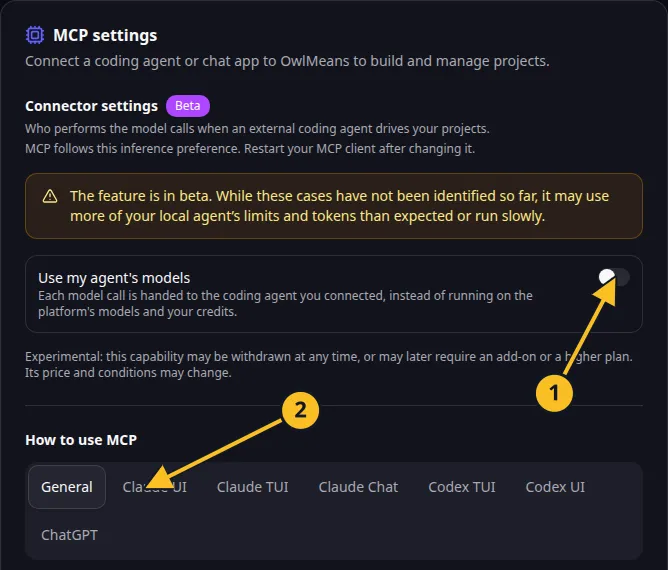
OwlMeans MCP settings: 1, inference preference; 2, client setup tabs. -
Poll
project_statusfor the returnedprojectIduntil the specification is ready. -
Show the specification to the person requesting the app. Apply the supported changes when they ask for corrections.
-
Call
confirm_projectonly after that review. Initialization builds the application foundation and screens. -
Follow
project_statusuntil the project is ready for feature development. -
Call
list_stories, choose one useful story and review its wording. -
Call
develop_storyfor that story once, then followstory_status. -
Try the completed behavior in the preview and check permissions.
{
  "prompt": "Create Task Grove, a task board for a small team. Members update their own tasks. Managers manage projects and all tasks. Include title, assignee, due date and status."
}
Screens can exist as placeholders before their stories are implemented. Review actual behavior before describing a feature as complete.
Use create_story or update_story for focused follow-up requirements. Read story tools and allowances. For delegated inference, the agent must continue handling tasks and questions while the run progresses.
Names and marks
OpenAI, ChatGPT and related OpenAI marks belong to OpenAI; Codex is an OpenAI product. Usage policy.
Claude and Claude Code are Anthropic products; their names and marks remain with their respective owner. Usage policy.
Node.js, npx names and any associated marks remain with their respective owners or project maintainers. References identify products, standards or source examples. OwlMeans documentation does not imply sponsorship or endorsement by those owners.