Top up credits and understand purchase limits

On this page
Top-ups add a purchased credit balance for supported work beyond your included allowances. One US dollar corresponds to 50,000 reference credit units. Currency, fees and tax affect the checkout amount.
Buy credits
-
Open Billing and select the credit top-up action.
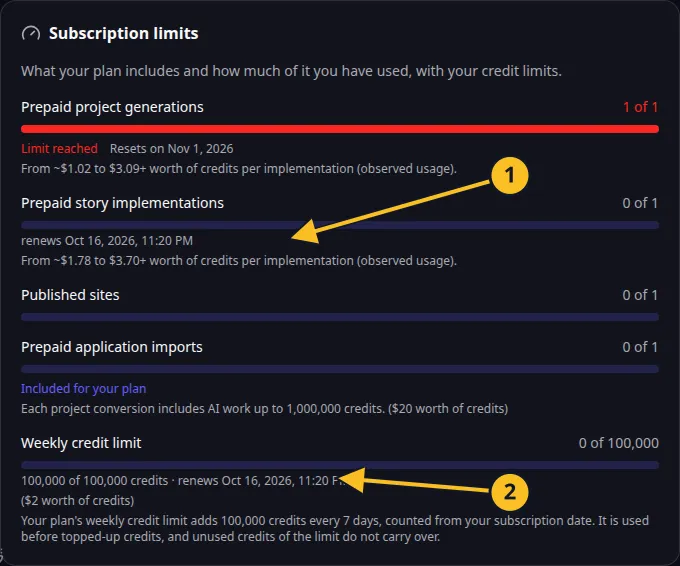
Billing: included action allowances and the current seven-day credit frame. -
Enter a net top-up between US$5 and US$500.
-
Check the purchase limit currently available to your account.
-
Review fees, tax, currency conversion and any consent about immediate use.
-
Complete checkout in the browser and return to Billing to check the balance.
The checkout gross-up accounts for US$0.30 plus 2.9%. A US$10 net top-up produces approximately US$10.61 before tax or currency conversion. The shown checkout total is the amount to review.
Purchase limits
| Tier | Maximum net purchase | Lifetime net purchase cap | Qualification |
|---|---|---|---|
| 1 | $20 | $50 | Starting tier |
| 2 | $50 | $100 | $40 billed usage |
| 3 | $100 | $250 | $80 billed usage |
| 4 | $250 | $500 | $200 billed usage and 7 days |
| 5 | $500 | $1,000 | $400 billed usage and 14 days |
| 6 | Ordinary transaction ceiling applies | Operator-approved capacity | Account-specific approval |
The caps concern lifetime net purchases, adjusted for refunds and active purchase reservations. They are not a monthly spending allowance. Buying credits and accumulating billed usage are different measures; a purchase alone does not satisfy a usage qualification.
Topped-up credits do not routinely expire while your account remains accessible. They are separate from the weekly Pro credits. Check withdrawal conditions and the Terms before purchase.