Weekly credit limits

On this page
Pro includes 100,000 AI credits per seven-day subscription-anchored frame. The current frame begins from the subscription anchor; it does not reset at the start of a calendar week.
Read your current frame
-
Open Billing and find the included credit limits.
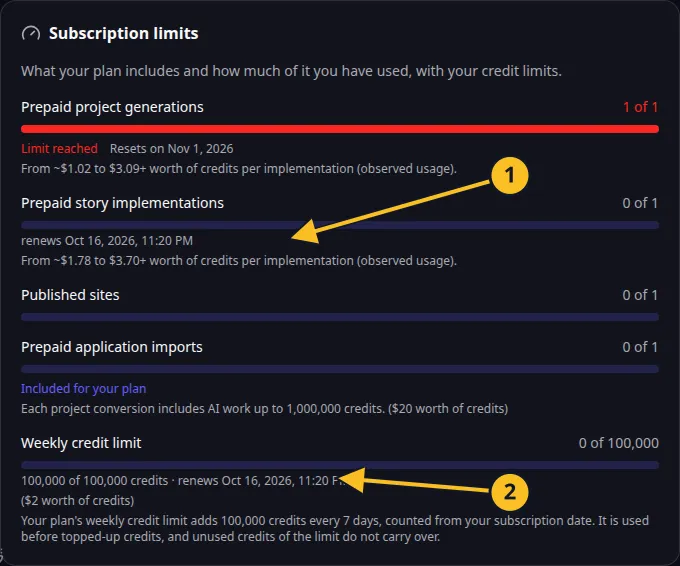
Billing: included action allowances and the current seven-day credit frame. -
Check the remaining included credits and the displayed reset time.
-
Compare your expected work with the available amount.
-
If more credits are needed, review the cost and your topped-up balance before proceeding.
For example, a subscription anchored on a Thursday uses seven-day frames beginning from that anchor. The account’s displayed reset time is the authoritative time to use.
| Rule | What it means |
|---|---|
| Included credits are spent first | Eligible usage draws from the current frame before topped-up credits. |
| Seven-day expiry | Unused credits expire with that frame. |
| No carry-over | Unused credits do not accumulate for later weeks. |
| No cash value | Included credits cannot be withdrawn as money. |
| Separate purchased balance | Topped-up credits have their own purchase and withdrawal conditions. |
Ordinary subscription cancellation stops renewal at the end of the paid period. The current credit frame keeps its own expiry. An eligible immediate withdrawal can end the current frame immediately; read withdrawal before choosing that action.
These are the current Pro figures: 100,000 credits and one included story per subscription week. See the Platform License for the applicable subscription conditions.