Publish your code to a GitHub repository

On this page
Create a repository for a hosted project’s generated source. Choose its visibility before publishing.
-
Connect GitHub and return to the project’s GitHub card.
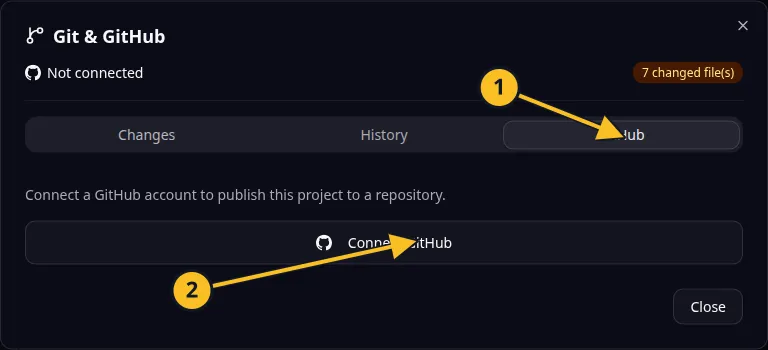
Git dialog: 1, GitHub tab; 2, Connect GitHub. Publishing and synchronization controls appear after connection. -
Enter the repository name in the publish form.
-
Set the private-repository option according to who should see the code.
-
Select Publish and wait for the result.
-
Open the repository link and check that the expected source and revision are present.
For Task Grove, a name such as task-grove makes the repository easy to identify. Use a private repository if the source should be limited to authorized collaborators.
A public repository lets other people read its source. Check files for private information before publishing. Secrets belong in application configuration, not in committed code.
The browser publish form creates a repository. If you need to select an existing repository or owner, review the MCP publication options and confirm the destination before running them.
Publishing source is separate from publishing the production app. Subsequent synchronization uses push and pull.
Application example
Category: Project and task management. Example: Task Grove, a task board for a small team.
Names and marks
GitHub and GitHub Copilot are brands of GitHub, Inc. Usage policy. OwlMeans documentation does not imply sponsorship or endorsement by those owners.