Push and pull changes with GitHub

On this page
Synchronize a published repository when work has changed locally or on GitHub. Push sends project changes outward. Pull brings remote changes into the project.
-
Open the project’s GitHub card and check its connection and repository link.
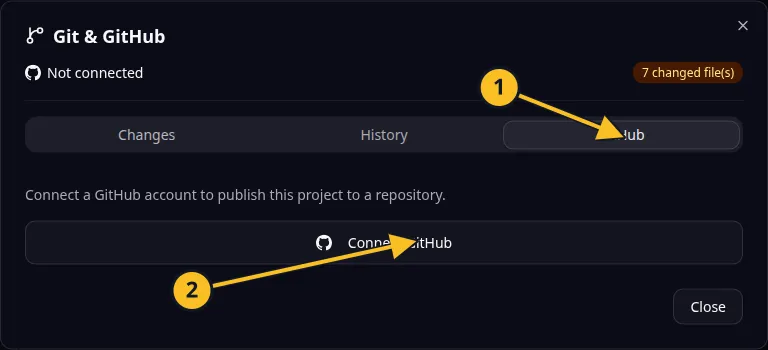
Git dialog: 1, GitHub tab; 2, Connect GitHub. Publishing and synchronization controls appear after connection. -
Review the current work and coordinate with anyone editing the same code.
-
Select Push to send the project’s changes to GitHub.
-
Select Pull when you want to bring changes from that repository into the project.
-
Read the result. If synchronization reports a conflict or failure, inspect both sides before repeating it.
-
Try the app in Preview after pulling code changes.
For Task Grove, pull a collaborator’s board change only after reviewing the revision you expect to receive. Check the board and task permissions afterward.
Use the MCP Git status and history tools for a detailed revision review. Do not discard local changes as a routine way to fix synchronization; discarding removes uncommitted work.
A successful push preserves source history. It does not back up the running application’s database or upload private service credentials.
Application example
Category: Project and task management. Example: Task Grove, a task board for a small team.
Names and marks
GitHub and GitHub Copilot are brands of GitHub, Inc. Usage policy.
Git names and any associated marks remain with their respective owners or project maintainers. References identify products, standards or source examples. OwlMeans documentation does not imply sponsorship or endorsement by those owners.