Git and GitHub integration
On this page
Keep the app’s code in a repository you control. Git records revisions; GitHub hosts a remote copy and lets collaborators work with it.
Choose your next action
-
Open the project controls and find the GitHub card.
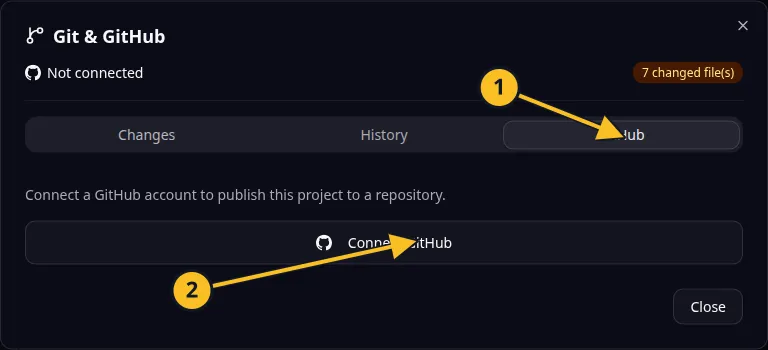
Git dialog: 1, GitHub tab; 2, Connect GitHub. Publishing and synchronization controls appear after connection. -
Connect GitHub if the project has no valid connection.
-
Publish its code to create a repository from the browser.
-
Push or pull changes when you are ready to synchronize.
-
Reconnect or disconnect when access changes.
A repository stores the source code and its revision history. Publishing code to GitHub is a different action from publishing a running website.
The browser supports creating a repository by name and visibility. The MCP GitHub tools also expose repository selection options. For an existing codebase, use Converter.
Review uncommitted work before synchronizing. A remote repository is useful for collaboration and recovery, but it does not include your running app’s database or private service credentials.
Application example
Category: Project and task management. Example: Task Grove, a task board for a small team.
Names and marks
GitHub and GitHub Copilot are brands of GitHub, Inc. Usage policy.
Git names and any associated marks remain with their respective owners or project maintainers. References identify products, standards or source examples. OwlMeans documentation does not imply sponsorship or endorsement by those owners.