Continue development with another coding agent

On this page
Use the project’s harness to help a new coding agent follow the application’s conventions. The harness supplies tailored guidance, skills and memory for the project.
-
Make the project source available in the workspace your agent will open.
-
Keep its existing guidance and memory files with the source.
-
Connect OwlMeans MCP and select the intended project location and inference mode.
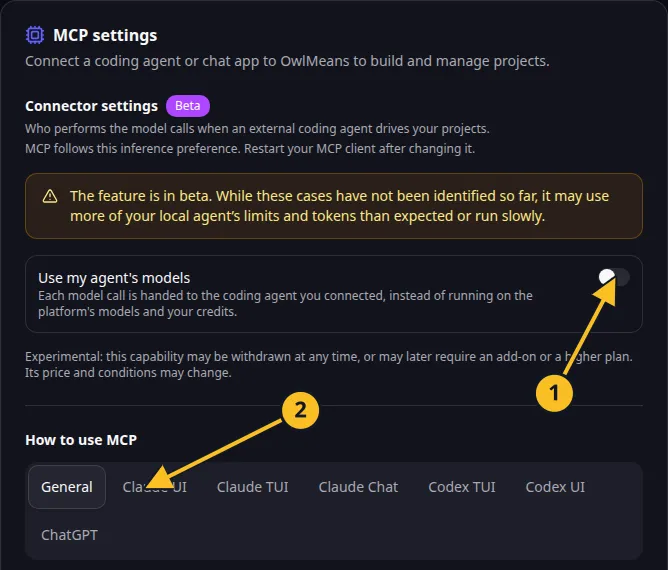
OwlMeans MCP settings: 1, inference preference; 2, client setup tabs. -
Install or review the harness for that agent.
-
Ask it to inspect the project and current stories before making changes.
-
Start with a small story and review the app afterward.
For Task Grove, ask the new agent to explain the existing task ownership rule, then add one due-date filter. This gives you a clear result to compare with the current app.
Local or delegated inference uses the connected coding agent to perform work. It does not automatically mean an on-device model or free inference. Your agent provider’s charges may still apply.
Guides are available for Claude Code in VS Code, Codex in VS Code and GitHub Copilot.
Application example
Category: Project and task management. Example: Task Grove, a task board for a small team.
Names and marks
GitHub and GitHub Copilot are brands of GitHub, Inc. Usage policy.
Visual Studio Code, VS Code, TypeScript and related Microsoft marks belong to Microsoft Corporation. Usage policy.
OpenAI, ChatGPT and related OpenAI marks belong to OpenAI; Codex is an OpenAI product. Usage policy.
Claude and Claude Code are Anthropic products; their names and marks remain with their respective owner. Usage policy.
Node.js, npx names and any associated marks remain with their respective owners or project maintainers. References identify products, standards or source examples. OwlMeans documentation does not imply sponsorship or endorsement by those owners.