Refine your application specification

On this page
The specification is your opportunity to correct the product before initialization. Read it as a description of how people will use the app.
-
Submit your application description and wait for the review screen.
-
Check the application name, user roles, records, main actions and intended boundaries.
-
Select Edit to change the app name (1 in the illustration) or specification (2). State concrete corrections, such as “Sales members may edit only contacts assigned to them.”
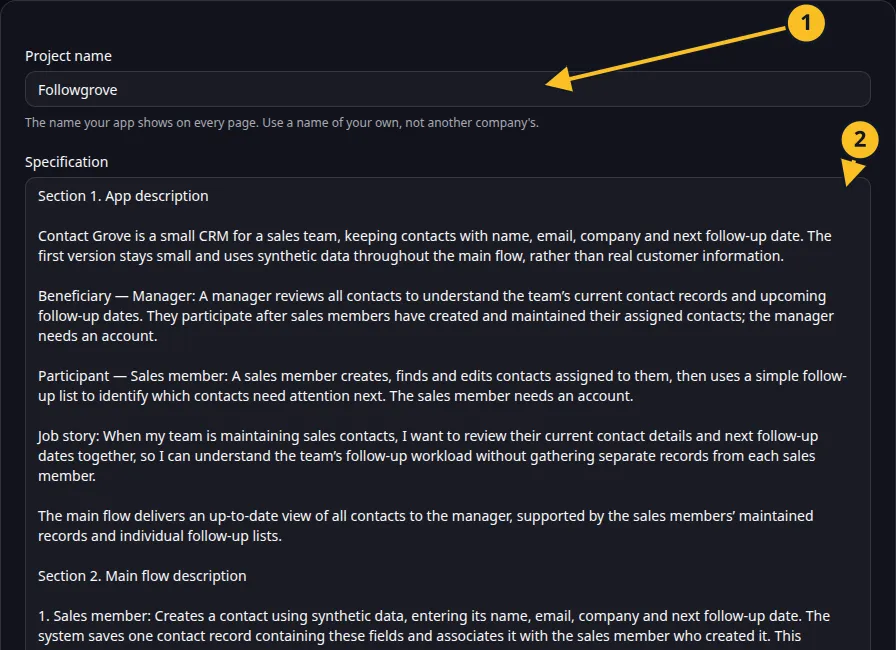
Specification editor: 1, app name; 2, specification. -
Apply the edits and read the revised text.
-
Select Accept when the scope is right. Keep the first version small enough to review.
Use the rename control if only the name needs changing. Cancelling at this stage abandons and deletes the unconfirmed project; read the confirmation before accepting that action.
Review checklist
- Is every role named?
- Are the essential fields present?
- Does the first version have a clear end-to-end workflow?
- Are access restrictions written as behavior you can check?
- Are external services and their credentials still to be supplied?
For Contact Grove, include contact ownership and manager access before accepting. Adding these facts early helps the generated screens and user stories describe the same product.
Application example
Category: CRM and customer management. Example: a small team CRM with contact ownership and manager access.