Understand your team's managed access

On this page
The platform gives your own team the access it needs to work in the app you build, so you are not locked out of your own project. You may see this access in the Users view before you add anyone.
- The organization that owns the project is placed in a group named
members. The group carries the app’s operator permissions, which cover the back office. - Project owners hold the admin permission. Owners are the person who created the project and anyone who launched an agent task on it. The platform grants it again whenever a task runs, so restricting it for an owner does not last.
Check your team’s access
-
Open Users, pick the app and open the Groups tab.
-
Choose your own organization. The
membersgroup shows a Managed badge.
Groups tab: 1, Managed badge on the members group. -
Open its Members. The list is read-only: “The platform keeps your team in this group.” To restrict one person, open that person’s own permissions.
-
Open the group’s Permissions to see what it holds. You can change these.
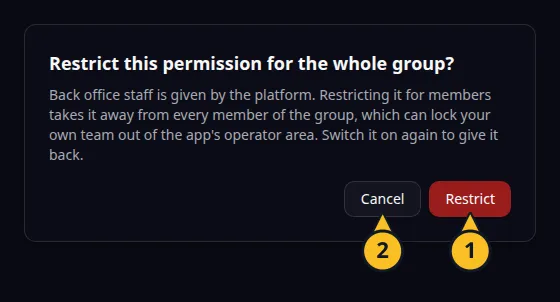
Confirmation before a platform permission is restricted for the whole group: 1, Restrict; 2, Cancel. -
In the Organizations tab, a member with the Managed badge was added by the platform and cannot be changed.
The platform keeps the group’s existence, its members and its bundles. Permissions you grant or restrict on the group stay in place when the platform updates the group.
The warning before you restrict
If you switch off a permission that the platform gave the group, a dialog asks “Restrict this permission for the whole group?” It explains that the restriction takes the permission from every member, which can lock your own team out of the app’s operator area. Choose Restrict only if you mean it. Switch the permission on again to give it back. To limit one person, restrict it in their own Permissions dialog instead.
See also Give permissions to groups and Manage organizations and members. Back to the section overview.
Application example
Category: Project and task management. Example: Task Grove, a task board for a small team. The Task Grove team organization stays in members, so its operators reach the back office without further grants.